

Your Guide to the Best Vibrator Remote Control App

Ever wondered how to sync a sex toy with your phone or give control to a partner who's miles away? You're not alone. Many people are curious about how a vibrator remote control app works, if it's secure, and how to get started without a lot of technical frustration.
The great news is that modern app-controlled toys are designed to be user-friendly, private, and incredibly fun. A good app turns your smartphone into a command center for pleasure, unlocking features that can transform your solo sessions and revolutionize how you connect with a partner, whether they're in the next room or across the country.
Exploring the World of App-Controlled Pleasure

So, how exactly does your smartphone spice things up? App-controlled vibrators are no longer a novelty; they're a powerful example of how technology is creating new avenues for pleasure. They merge the satisfying physical feedback of a high-quality toy with the limitless possibilities of digital control.
At its core, the technology is straightforward. Most of these toys use Bluetooth to pair with your smartphone, creating a secure and private connection. Once linked, you or a partner can take the reins, adjusting everything from intensity to rhythm without ever touching the toy's physical buttons. It's a prime example of how tech is enhancing intimacy and play.
What Makes App Control So Appealing?
The magic of a vibrator remote control app goes beyond simple convenience. It unlocks a whole new level of intimacy and self-discovery that traditional toys just can't match.
Think about it: handing control over to a partner, whether they're next to you or thousands of miles away, introduces an electrifying dynamic of trust and surprise. This is a game-changer for long-distance relationships, closing the physical gap and allowing couples to share an intensely personal, real-time experience. It's all about feeling present and connected, no matter how many miles separate you.
The real beauty is the sheer variety of control. You're not stuck with a few pre-programmed patterns. Apps let you design your own custom vibes, sync them to your favorite playlist, or even have them react to the sounds around you for a truly unique session.
Common Features in a Vibrator Remote Control App
As you explore app-controlled toys, you'll find a host of features designed to make the experience more personal and exciting. While the specifics can vary by brand, most top-tier apps share some fantastic core functions.
Here’s a quick look at the most exciting features you can expect from a modern app-controlled vibrator.
| Feature | What It Does | Best For |
|---|---|---|
| Long-Distance Control | Gives a partner remote access to control the toy's functions via a secure link from anywhere in the world. | Long-distance couples or adding an element of surprise to date night. |
| Custom Pattern Creation | Lets you draw vibration patterns on your screen with a finger, creating one-of-a-kind sequences. | Getting creative with solo play or designing a special vibe for a partner. |
| Music Sync | Matches the toy's vibrations to the rhythm and beat of your music. | Creating a multi-sensory, immersive experience. |
| Community Patterns | Allows users to upload, download, and try out vibration patterns created by others in the community. | Discovering new sensations and seeing what others enjoy. |
These features provide an incredible amount of freedom to play. You're not just using a toy; you're crafting a personalized experience every single time.
Finding and Installing the Official App for Your Toy
Okay, before the real fun begins, you need to get the right software on your phone. This might seem obvious, but tracking down the official vibrator remote control app for your specific toy is the most critical first step. It ensures everything works seamlessly and, more importantly, securely.
The app stores can be crowded, and unfortunately, knock-off or sketchy third-party apps exist that can be a privacy nightmare. The safest bet is always to stick with the official source provided by the toy's manufacturer.
Your toy’s packaging or instruction manual is your best friend here. Most brands include the exact name of their app or even a handy QR code that takes you directly to the correct download page in the Google Play Store or Apple App Store.
Navigating the App Store Safely
Once you know the app's name, search for it directly. You might see a few that look similar, but a little detective work will point you to the right one. Be skeptical of apps with strange names, very few downloads, or a string of one-star reviews—those are usually red flags.
A legitimate app from a known brand will almost always have a polished icon, clear screenshots of the interface, and a healthy number of user ratings.
- Check the Developer Name: Does the developer listed right under the app’s title match the brand of your toy? It should.
- Read Recent Reviews: See what others are saying. This is a great way to get a heads-up on any recent bugs or connection problems.
- When in Doubt, Check the Website: If you're still not 100% sure, just go to the manufacturer’s official website. They’ll have a direct link on their product page, which removes all guesswork.
Your privacy is everything. Unofficial apps might ask for too many permissions or, in a worst-case scenario, contain malware. Taking an extra minute to verify you’re downloading the real deal is always time well spent.
Understanding App Permissions and Setup
Got the app downloaded? Great. The next step is a quick setup process. This typically means creating an account, which usually just requires an email and a password. Pro tip: use a strong, unique password you haven’t used for other accounts.
During setup, the app will ask for permission to access certain features on your phone. It’s smart to understand what you’re agreeing to.
- Bluetooth Access: This is non-negotiable. The app absolutely needs Bluetooth to find and connect to your toy.
- Location Services: Don't be alarmed. Some apps, especially on Android, need this enabled to use the specific type of Bluetooth connection (Bluetooth Low Energy) that toys rely on. The app isn't actually tracking where you are.
- Microphone Access: You’ll only need this if you want to use features like syncing vibrations to music, your voice, or ambient sound. If that’s not your thing, you can safely deny this permission.
- Access to Files/Photos: This is another optional permission, typically used for features that let you sync patterns to your own music or videos. If you don't plan on using it, feel free to skip it.
Getting these initial settings right is your ticket to a smooth, secure start with your new app-controlled toy.
Getting Your Vibrator and App Synced Up
Alright, you have the app installed. Now for the exciting part: making your phone and toy talk to each other. This is where the interactive magic happens, and thankfully, most brands have made this process incredibly straightforward using Bluetooth technology.
It’s really no different than pairing new wireless earbuds. You’ll put the toy into “pairing mode,” tell your phone to look for it, and then confirm the connection inside the vibrator remote control app. Once that digital handshake is complete, the app becomes your new command center.
This handy visual breaks down the entire flow, from the initial app download all the way to playing with the remote features.
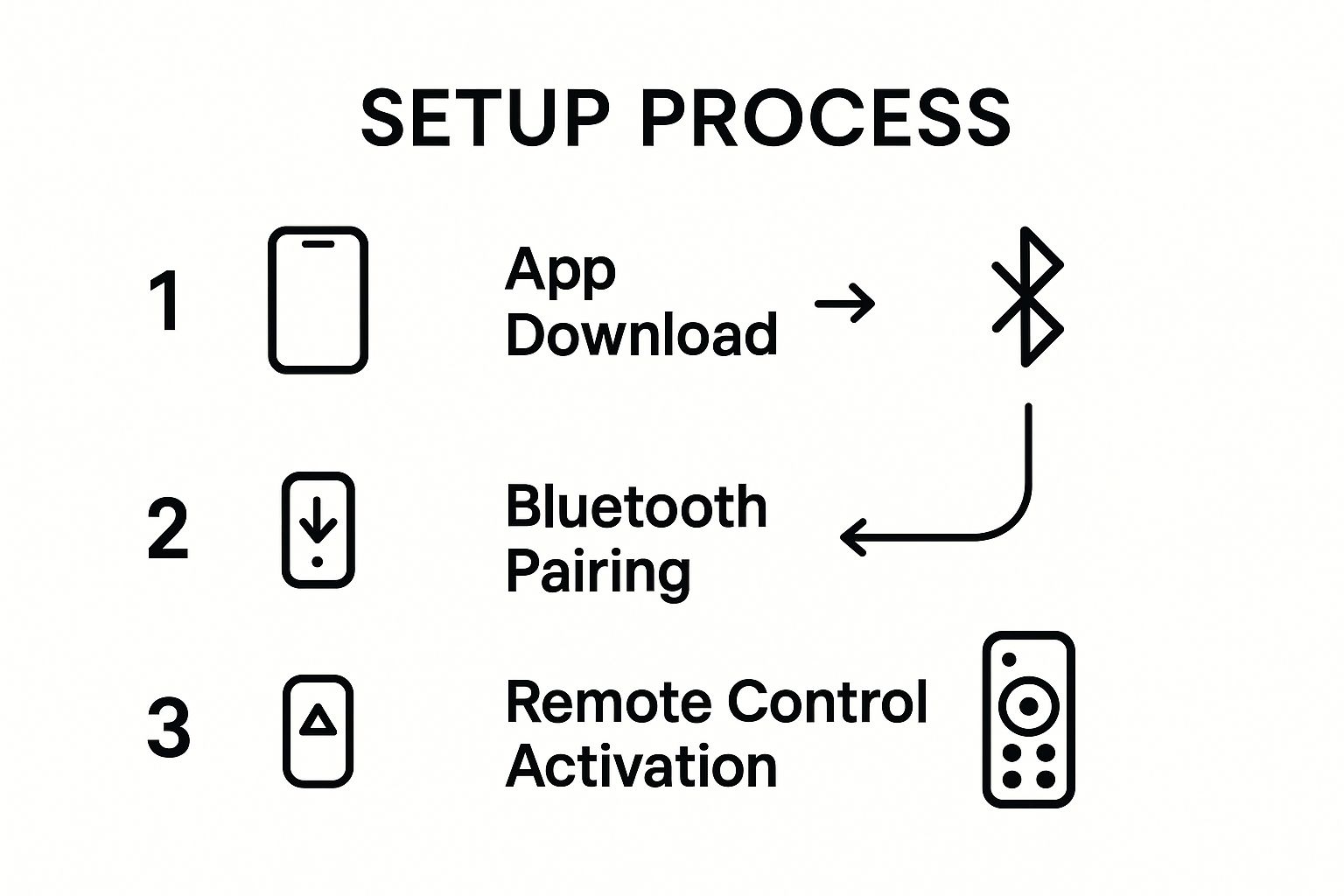
As you can see, it's designed to be a quick, logical progression that gets you from unboxing to playtime with as little tech-related headache as possible.
Waking Up and Pairing Your Toy
First things first, make sure your toy has a full battery. A low charge is the number one culprit behind connection failures, so it's always worth topping it off before you start.
Next, you need to get the toy into its Bluetooth pairing mode. You can usually do this by pressing and holding the power button for a few seconds. You'll know it's working when an indicator light starts flashing, typically in blue. That blinking light is the toy's way of saying, "I'm here and ready to connect!"
Once the toy is blinking, grab your phone and follow these quick steps:
- Turn on Your Phone's Bluetooth: Go into your phone’s settings menu and make sure the Bluetooth toggle is "On." You don't need to hunt for the toy in your phone's list of devices—the app will handle that.
- Open the Control App: Launch the official app you downloaded. It should have a clear "Connect Toy" or "+" button on the main screen.
- Let the App Scan: The app will automatically start searching for nearby toys. Within seconds, your vibrator’s name should pop up on the screen.
- Tap and Confirm: Just tap your toy's name in the app. The blinking light on the toy will usually switch to a solid, steady light. That’s your confirmation—you're officially paired!
Pro Tip: Can't find the toy in the app? Don't panic. The oldest trick in the IT book almost always works. Just turn off the toy, toggle your phone's Bluetooth off and on, count to ten, and then try the process again. This simple reset clears up most connection hiccups.
What to Do When the Connection Acts Up
Even with the best tech, things can get a little quirky. If your connection drops or feels laggy, a couple of simple fixes usually sort it out.
Most of the time, an unstable connection is caused by distance or physical obstruction. Bluetooth is great, but it has its limits—the signal is strongest within about 30 feet (or 10 meters) in an open space. Walls, furniture, and even your own body can interfere with the signal. For the most reliable connection, just keep your phone reasonably close to the toy.
If you want to learn more about how range and control work for different play styles, our complete remote control vibrators guide for solo and couples play breaks it all down. A few small adjustments are all it takes to make the tech feel completely invisible.
Mastering App Features for Solo and Partner Play
Okay, your toy and phone are connected. Now the real fun begins. The true magic of a vibrator remote control app isn’t just about turning it on and off from a distance; it's about all the creative ways you (or a partner) can direct the show. This is your chance to go way beyond the standard buttons on the toy itself.
Think of it as your digital playground. You can explore rhythms designed by experts or become a conductor, creating your own symphony of vibrations. These apps are built for both deeply personal solo time and for fun, interactive play with a partner, keeping things exciting every single time.
Exploring Solo Play Features
When you're flying solo, the app is your ultimate pleasure toolkit. You’re no longer limited to the handful of patterns programmed into the device. Suddenly, you have a full control panel at your fingertips.
Most apps provide a library of preset patterns to start with. These can range from a gentle, rolling wave to intense, pulsing rhythms that build and crash. It’s a great way to discover what you like without overthinking it.
But the real creativity comes from features like these:
- Custom Pattern Creation: This is where you get to be the artist. Many apps have a touch-and-draw interface where you can literally sketch a vibration pattern with your finger. The speed and motion of your touch become the toy's rhythm.
- Music Sync: Ever wanted to feel the music? This feature connects the toy’s vibrations to the beat of your favorite songs, turning your playlist into a full-body experience.
- Sound Activation: Some apps can use your phone's microphone to make the toy respond to nearby sounds. It could be your voice, music in the room, or even the sound of a movie—the toy will pulse along with it.
The ability to create and save your own patterns is a total game-changer. You can design that perfect wave of sensation that’s built just for you, save it, and come back to it whenever you want. It's a level of personalization that makes the experience so much more intimate.
Connecting with a Partner Near or Far
This is where app-controlled toys completely change the game for couples. Handing over the controls to a partner adds an incredible element of surprise, trust, and connection—whether they're sitting right next to you or are on the other side of the world.
Getting connected is usually simple and secure. You just send an invite link to your partner from inside the app. Once they accept, the control panel appears on their phone, letting them change patterns and intensity in real time.
This tech has become a vital tool for long-distance relationships. Being able to share an intimate, physical experience despite the miles can be a powerful way to maintain a close bond. You can find more insights on how the growing sex toys market is shaping modern relationships.
To make that connection feel even more real, many apps now include communication features right alongside the controls:
- Video and Text Chat: You can chat with your partner directly in the app while you play. Seeing their reactions or sending messages in the moment bridges the distance and makes everything feel more immediate and connected.
- Community-Shared Patterns: Don't know what to try next? Many apps have a community section where people can upload and share the custom patterns they've created. It’s a fantastic way to try something new that you know someone else has already enjoyed.
Your Guide to Safety and Privacy
Bringing a vibrator remote control app into the bedroom means you're mixing technology with some of your most private moments. While exciting, it also means it's crucial to talk about digital safety and privacy. A few simple precautions can ensure your experience is secure, letting you relax and play without a worry in the world.
Think of your app account like you would your online banking—it needs a solid defense. The single best thing you can do is create a strong, unique password. Don't reuse a password from another account. Mix uppercase letters, lowercase letters, numbers, and symbols to create something truly difficult to guess.
Managing App Permissions and Data
When you first open the app, it's going to ask for permissions on your phone. It’s tempting to just click "Allow" on everything, but take a moment to review what it's asking for.
Some requests, like Bluetooth, are necessary for the app to connect to your toy. But others might be optional. For instance, if you don't plan on syncing vibrations to your Spotify playlist, the app doesn't need access to your microphone. Be selective and only grant permissions for features you actually want to use.
It’s also smart to know what kind of data the app is collecting. A reputable brand will be transparent about this in their privacy policy. Look for clear, easy-to-understand language that explains:
- What specific info they collect (like usage data or account details).
- How they use and store that data.
- If your data is anonymized, which is a huge plus for protecting your identity.
Spending five minutes scanning the privacy policy tells you a lot about how much a company values your privacy.
A trustworthy app will always prioritize your privacy. This means they collect as little data as possible and use strong encryption to protect it. If you can't find a privacy policy or it's full of confusing legal jargon, that’s a major red flag.
Stick to Official and Reputable Sources
This one is non-negotiable: only download the app from the official Google Play Store or Apple App Store. Always double-check that the developer listed is the actual toy manufacturer.
Downloading from third-party sites or using a knock-off app is asking for trouble. You could be opening the door to everything from malware to data theft. Sticking to the official vibrator remote control app is the only way to know you're getting secure, tested, and legitimate software.
These connected devices are amazing tools for pleasure and exploration. To dive deeper into this world safely, check out our comprehensive smart sex toys guide for more tips. By being mindful of these simple safety practices, you can confidently enjoy every feature your app-controlled toy has to offer.
Troubleshooting Common App and Connection Problems
Even the most amazing tech can have its off days. If your vibrator remote control app is suddenly being difficult or your toy is playing hard to get, don't give up. Most of the time, the fix is surprisingly simple and will have you back up and running in minutes.
These hiccups are almost always caused by a minor software glitch or Bluetooth interference. A quick reset or moving to a different spot is often all you need. Let's walk through the most common headaches and exactly how to solve them.
Why Won’t My Toy Connect to the App?
This is, without a doubt, the number one frustration. You’ve got the toy charged, the app is open, and… nothing. The "searching" icon just spins forever.
Before you get annoyed, run through this quick checklist. You’d be surprised how often it’s one of these simple things.
- Is your Bluetooth actually on? It sounds basic, but we've all done it. Double-check that Bluetooth is enabled in your phone's settings.
- Is the toy in pairing mode? Most toys need to be put into a special pairing mode, which often involves holding the power button until a light starts flashing.
- Is it fully charged? A low battery is the secret enemy of a stable connection. The toy might turn on but lack the power to maintain the Bluetooth link.
- Are you too far away? Bluetooth's range is about 30 feet (10 meters) with a clear line of sight. Try bringing your phone right next to the toy.
If you’ve checked these and are still stuck, it's time for the classic tech fix: turn it off and on again. Force-close the app, toggle your phone's Bluetooth off and on, and power the toy down. Wait ten seconds, then start the pairing process from scratch.
What if the App Keeps Crashing or Freezing?
There’s nothing worse than an app crashing mid-session. This usually points to a software issue on your phone, not a problem with the toy itself.
An outdated app is the most common culprit for instability. Developers constantly release updates to fix bugs and ensure compatibility with the latest phone operating systems. Keeping your app updated is your best defense.
First, head to your phone's app store (Google Play or Apple App Store) and see if there’s an update for your vibrator remote control app. If you're already on the latest version, try clearing the app's cache. You can do this in your phone's settings menu under "Apps" without losing your login details.
If crashing persists, you might have a rare compatibility issue. Check the app’s store page or the manufacturer’s website to confirm that your phone model and OS version are officially supported.
Tackling Performance Lag and Spotty Connections
Sometimes the toy connects, but the response is sluggish or it keeps dropping out. This is a classic case of signal interference. Bluetooth uses a busy radio frequency, and many of your other household gadgets are competing for the same airwaves.
Things like your Wi-Fi router, microwave, and even other Bluetooth devices like smartwatches or headphones can disrupt the signal. If you're noticing lag, try moving away from other electronics. Simply keeping your phone in the same room and reasonably close to the toy will solve the vast majority of these performance blips.
Ready to skip the headaches and find an app-controlled toy that just works? The collection at My Luxury Toys features reliable, high-quality devices from brands we trust, all designed for a seamless connection and incredible fun.
Explore our collection of app-controlled toys at My Luxury Toys!